Collect exciting videos
See interesting news videos, tutorials, or speeches, save them locally with just one click, and watch them offline anytime.
Save videos, GIF animations, and multiple images from Twitter/X tweets directly in Chrome, Edge, and Firefox browsers without the need to copy links. High definition original images can be installed and used immediately.
No registration required, local operation, no collection of account information
Twitter/X officially does not provide the function of one click saving of tweet media. The process of copying links, switching pages, and waiting for parsing when watching exciting videos, emojis, or multi image albums is both tedious and prone to failure. After installing the browser plugin, all operations are completed within the tweet page.
See interesting news videos, tutorials, or speeches, save them locally with just one click, and watch them offline anytime.
Popular GIFs and memes can be easily saved for use on other social media platforms or chats.
Marketers and researchers can save tweet captions in bulk for compliance data organization and archiving.
After saving your favorite media content, it is easy to reference or create it on other platforms (please comply with copyright regulations).
Six core abilities designed specifically for Twitter/X media storage, making downloads as simple as liking
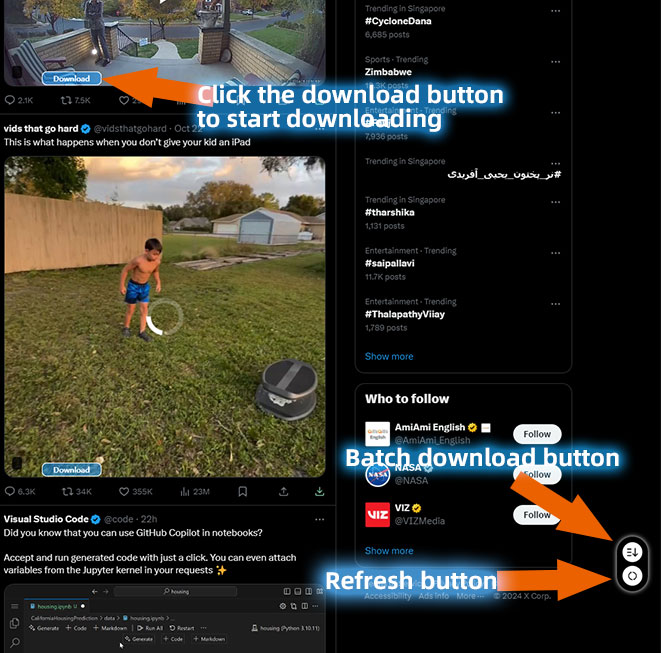
Automatically add a download button next to the video tweet, saving the source site MP4 directly without copying the link to a third-party website.
Multi image tweets support one click packaging and downloading of all images, suitable for saving albums, screenshots, and profile pictures.
Automatically identify GIF media in tweets and save them without missing any dynamic content.
Whether X uses a new or old domain name, the plugin can automatically recognize and display the download entry.
Prioritize obtaining the highest definition media files provided by the source site to preserve the best viewing experience.
All recognition and download logic is completed locally in the browser, without collecting account passwords or uploading browsing history.
The plugin will automatically recognize multiple media types in public tweets and provide a one click save entry
Save the MP4 video embedded in the tweet and prioritize obtaining the highest resolution provided by the source site.
Identify GIF content distributed in MP4 format and click to save it locally.
One click packaging saves all the images in the tweet, without the need to right-click each image to save as.
Select the browser you are currently using and go to the corresponding store for one click installation
The most popular browser in the world, with a rich plugin ecosystem that automatically synchronizes to logged in devices after installation.
Go to Chrome StoreWindows comes with a built-in browser, based on Chromium, with good plugin compatibility and stable operation.
Privacy conscious browsers with lightweight and secure plugins, suitable for users with high privacy requirements.
Three steps to complete installation, save the first tweet media in ten seconds
Click on the Chrome Store, Edge Store, or Firefox Store buttons above, enter the store page, and click "Add to Browser" to complete the installation.
After installation, open Twitter. com or x.com. The plugin will automatically recognize the current page.
A download button will automatically appear near tweets containing videos, GIFs, or multiple images. Click to save the media to the local default download directory.
If you frequently save Twitter/X media, browser plugins are a more efficient and stable choice
| Comparison item | Online downloader | Twitter Media Downloader Plugin |
|---|---|---|
| Operation method | Copy link and paste again | One click download within tweets |
| Batch saving of images | not supported | One-click packaging |
| Adapt to x.com/Twitter. com | partial support | auto-adaptation |
| Private/Restricted Links | Usually fails | more stable |
| privacy security | Need to send a link to the server | Local identification |
Twitter Media Downloader is a browser extension tool designed specifically for Twitter and X platform users. Whether you are using Chrome, Edge, or Firefox, after installation, you can directly see the download portal on the tweet page, helping you quickly save your favorite videos, GIFs, and images.
Unlike online parsing websites, this plugin runs entirely locally on your browser. When you browse Twitter. com or x.com, the plugin automatically detects media resources on the page and generates corresponding download buttons below each tweet. You don't need to copy links, switch tabs, or wait for the server to parse, just click to save the file to your computer.
For users who frequently need to backup their tweet media, collect emojis, save news videos, or organize learning materials, this plugin can significantly improve efficiency. Multi image tweets support one click package download, and videos and GIFs will also try to obtain the highest definition version provided by the source site.
Please note that this plugin only supports publicly accessible tweet media. We will not and will not attempt to bypass any privacy settings or login restrictions. Please comply with Twitter/X's terms of service and local copyright laws when using it, and only download content that you have the right to save.
Detailed answers on installation, usage, privacy, and compatibility
Click the button below to go to the corresponding browser store to install the plugin for free
This extension is not associated or affiliated with Twitter, Inc. or X Corp. It is an unofficial app developed and maintained by an independent developer.
We recommend users not to download copyrighted content without permission.