Find a video and save it
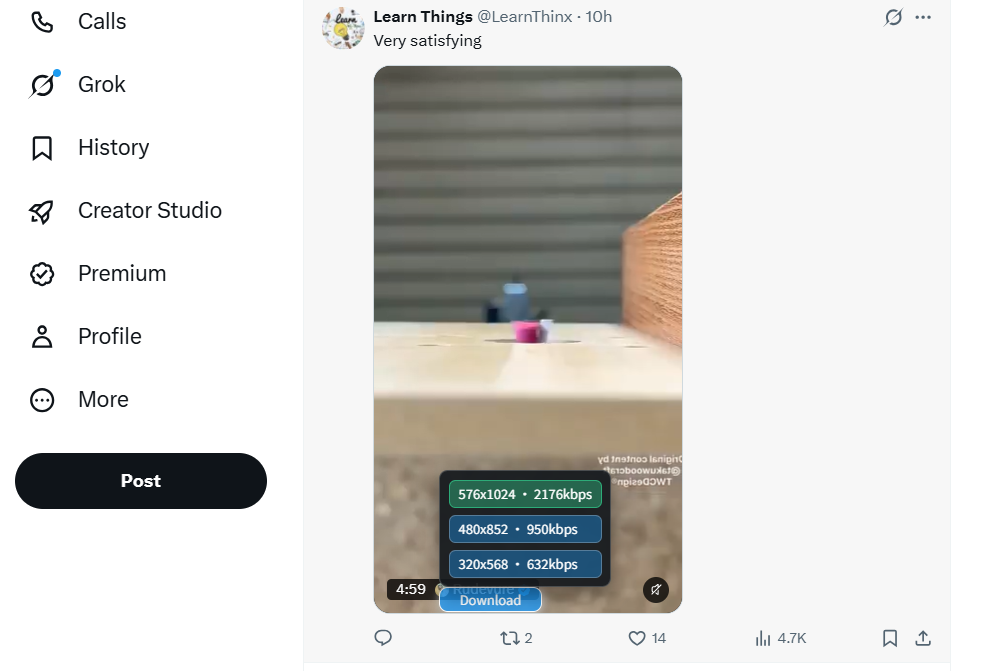
Save an MP4 from the download button beside a post. Choose a suitable quality when multiple sources are available. GIFs distributed as video are also saved as MP4.
Explore quality and formatsDesktop Chrome extension Built for browsing X
Twitter Video Downloader for X helps you save X (formerly Twitter) videos, GIFs and photos in desktop Chrome. Choose source quality or select loaded videos in batches, without repeatedly copying post links.
6 basic downloads daily · Account rewards and paid plans are separate
For desktop Chrome; on mobile, use the Online downloader.
Less switching, easier saving
The DownloadVideos365 X extension puts download controls on the page you are browsing, for videos, reference material and post photos you have permission to keep.
Save an MP4 from the download button beside a post. Choose a suitable quality when multiple sources are available. GIFs distributed as video are also saved as MP4.
Explore quality and formatsLoad the posts, open the batch panel, check the previews and select the videos to download. The list contains media detected while browsing; it does not automatically scan an entire account.
See the batch download panelUse the save control beside a photo to organize post images and reference material. This does not create a ZIP of multiple photos or change the copyright of the original content.
See the full support details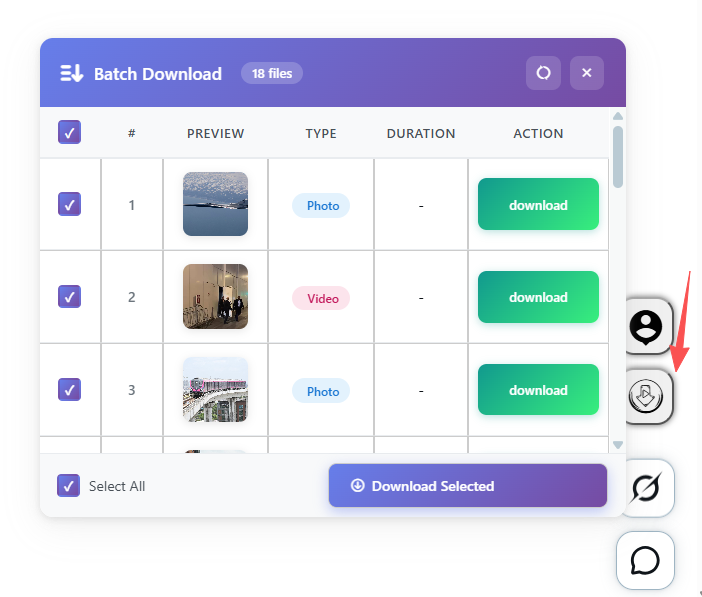
Check first, then select
After browsing the posts, open the batch list from the side of the page. Check thumbnails and media types, then download individually or select items and use Download Selected.
The screenshot shows content detected in the current browsing session. The extension does not automatically retrieve an account’s entire video history. Continue browsing to load posts that have not appeared yet.
See installation and usage steps →Start in three steps
Refresh X after installation. Before a batch download, load the videos you want on the page.
Open the official store in desktop Chrome, review the extension and its permissions, then select Add to Chrome. Refresh any X pages already open after installation.
Visit X.com and find content you have permission to save. Scroll to the post and play the video. For batch downloads, first browse and load the videos you want.
Click the download button beside the media and choose from the available source qualities. You can also open the batch panel, select detected videos and download them. Find your files in Chrome’s download history.
Files normally go to the download folder set in Chrome. If Ask where to save each file is enabled, choose a folder when prompted. Check the browser’s download history for the result.
Keep the source file as it is
The extension saves available video files and lets you choose source quality. It does not upscale low-resolution content. If HD is missing, check whether the source offers a higher resolution.
Account and download allowance
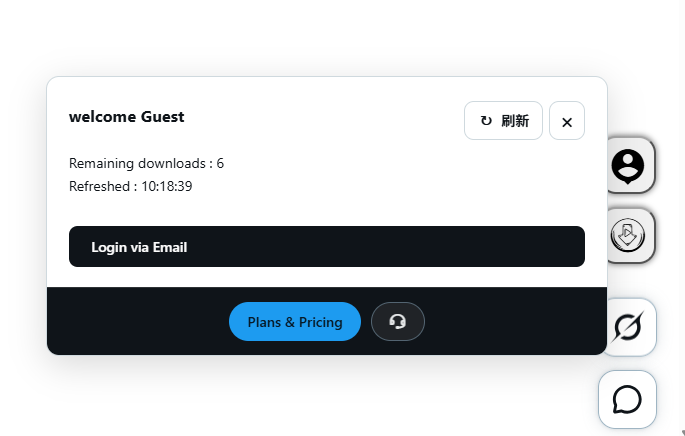
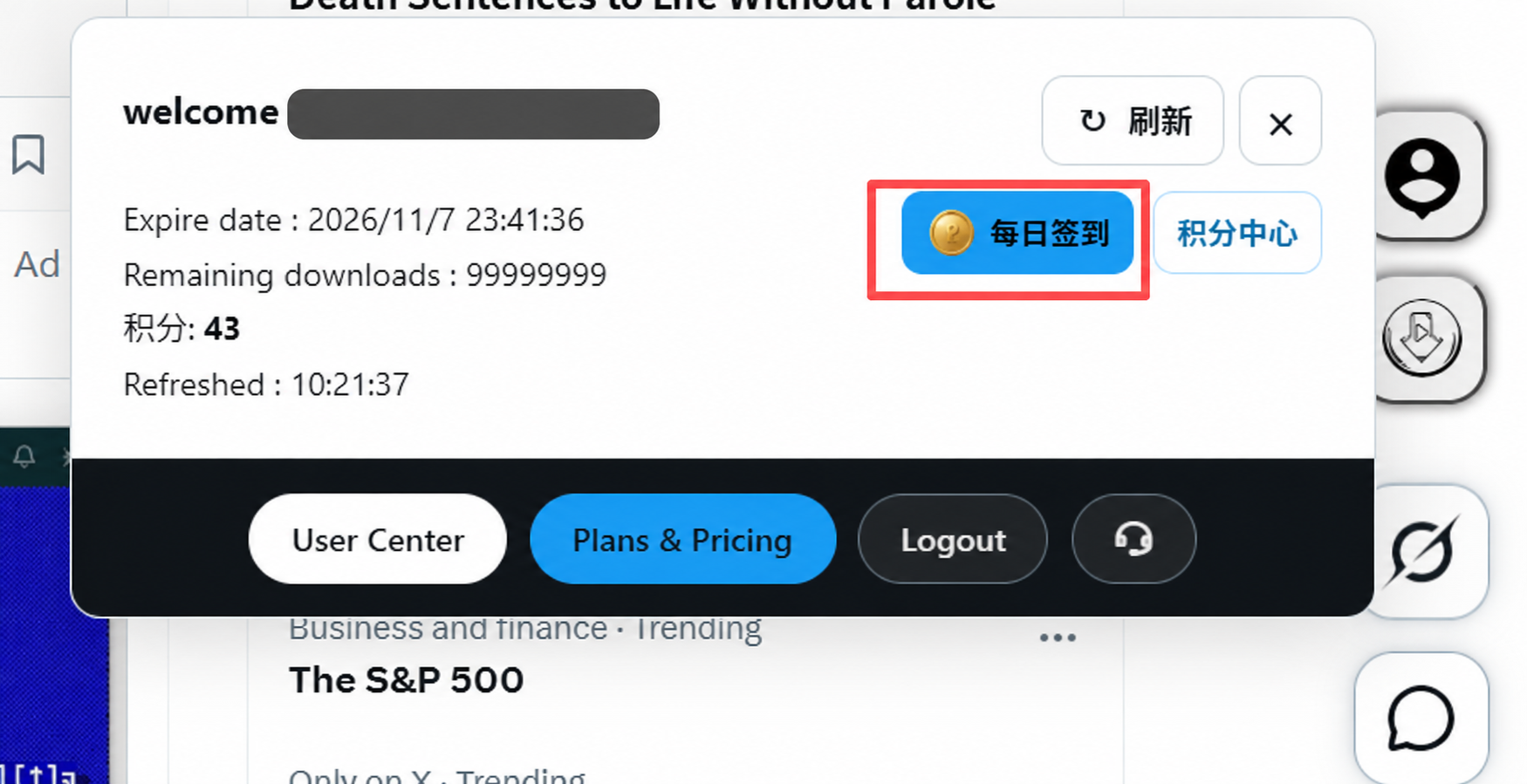
Open the account panel at the side of X to see remaining downloads, plan expiry and points. Refresh retrieves the server balance. View plans and current prices under Plans & Pricing.
View Chrome storeOpen the side account panel and select Login via Email to register or sign in with an email code. Refresh your balance after signing in, then choose what to save.
After signing in, select Daily Check-in to claim on the website. View points in the Points Center and manage your account in User Center. Plans and prices are shown on the purchase page.
Before you install
| Item | Support | Usage notes |
|---|---|---|
| Environment | Desktop Google Chrome | Use Chrome on Windows, macOS or Linux. This page provides only the verified Chrome store link. |
| Websites and media | X.com / Twitter.com | Handles videos and photos that can be accessed, loaded and detected on the page. It does not bypass account or content restrictions. |
| Videos and GIFs | Available source MP4 files | Quality depends on the source. GIFs distributed as MP4 are saved as video. 4K is not guaranteed, and MP3 conversion is not provided. |
| Batch saving | Detected videos | Browse and load first, then select and download. It does not fetch an account’s entire history or package photos into ZIP files. |
| Phones and the X app | This desktop extension does not apply | Try the X online video downloader with a public post link. Available content and allowances follow the website’s rules. |
Understand what each permission does
Extension accounts are separate from X accounts. Media detection and saving work in the browser; sign-in, balances, rewards and payments use account services. The extension is not fully offline.
You can disable site access, turn off or uninstall the extension in Chrome’s extension settings. This does not automatically cancel purchased plans or delete your website account. Contact support if needed.
Read the extension privacy policyCheck these first
Refresh open X pages, enable the extension and allow access to X.com. Then play the video and wait for it to load.
Scroll to the posts and load their videos before opening the batch panel. The list does not automatically fetch history you have not browsed.
Check Chrome’s download history for a failure, block or folder-selection prompt, then refresh your account balance. Retrying does not bypass restrictions on inaccessible media.
Still need help? Contact support with your browser version, what you see and any error message. Do not send passwords or verification codes.
Straight answers
About free allowances, batch scope, GIF formats and installation in Chrome.
It is a Chrome extension by DownloadVideos365 that adds video and photo download controls to X, formerly Twitter. Save source MP4 videos, GIFs distributed as MP4 and post photos, or select videos detected while browsing in the batch panel.
Guests and regular accounts have a basic allowance of 6 downloads per day. Guests can use this allowance without signing in. Once it is used up, register or sign in to the extension to see available rewards, check-in and plans. Signing in does not grant another daily allowance; the account panel shows your actual remaining balance.
An account that has never claimed the Twitter first-login reward can receive 100 one-time downloads by signing in through this extension with an email code. They remain available until used. Accounts that claimed a previous reward for this platform cannot claim again. Complete the Twitter check-in each day to receive 100 downloads, valid for 2 days. Signing in to the website alone does not trigger the extension’s first-login reward.
The extension does not automatically retrieve an account’s history. The batch panel handles videos loaded and detected during your current browsing. Scroll to load the posts, check the list and select the videos. Batch downloads are also subject to your actual account allowance.
Available quality depends on the source videos supplied by X. You can choose when several sources are available; a single source has no alternative qualities. The extension does not upscale low-resolution videos or guarantee 1080p or 4K for every video.
GIFs on X are usually distributed as video files. The extension saves the available MP4 rather than converting it into a GIF image. It does not extract MP3 audio or convert formats. After downloading, you can use an appropriate editor for content you have permission to use.
Refresh X.com, check that the extension is enabled and allowed to access X, then scroll to the post and play its video. If the batch panel is missing content, load those posts. If detection still fails, check for Chrome store updates and your account allowance, then contact support. The extension cannot restore deleted, restricted or inaccessible media.
This page links to the official store for desktop Chrome. There is no Firefox version here, and this is not an extension for the mobile X app. On a phone, or when installing an extension is inconvenient, try our X online video downloader for publicly accessible post links.
The extension saves accessible source media without adding watermarks or removing existing marks. It does not bypass X access restrictions. Private, deleted or geographically restricted content may not be available. Download only content you have permission to save.
No. The extension account uses email sign-in to manage download allowance, rewards and plans; its server processes the relevant email address and account status. Sign in to X on X’s official pages. Do not enter your X password or verification codes in the extension account form.
Choose the method that fits this time
The Chrome extension suits saving while browsing, selecting multiple videos and downloading photos. The online tool suits public post links on a phone or when an extension is inconvenient. Each follows its actual allowance rules.
Independently developed by DownloadVideos365, with no affiliation to X Corp. or Twitter. Download only content you have permission to save.Terms of serviceContact support